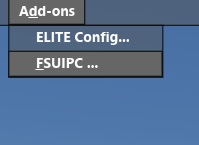
The original problem is simply a software module (sim connect) that has NOT been installed by your download of FSX. In 95% of cases this is a non issue, but if you are reading this then it means you are the 5% of missing sim connect. After your ELITE driver has been successfully installed. and your menu looks like this:

Some simple installs will cure this, if you run the following installers you will have all the required software.
C:\Program Files (x86)\SteamLibrary\steamapps\common\FSX\SDK\Core Utilities Kit\SimConnect SDK\LegacyInterfaces\FSX-RTM\SimConnect.msi
C:\Program Files (x86)\SteamLibrary\steamapps\common\FSX\SDK\Core Utilities Kit\SimConnect SDK\LegacyInterfaces\FSX-SP1\SimConnect.msi
C:\Program Files (x86)\SteamLibrary\steamapps\common\FSX\SDK\Core Utilities Kit\SimConnect SDK\LegacyInterfaces\FSX-XPACK\SimConnect.msi
By running all these installers now your Sim connect will be up to date, and your new menu will look like this: